
A personal space for your employees’ working life
Employee 360 brings the information employees need and the actions they can take into one workspace. Content and access follow your company’s roles and permissions.
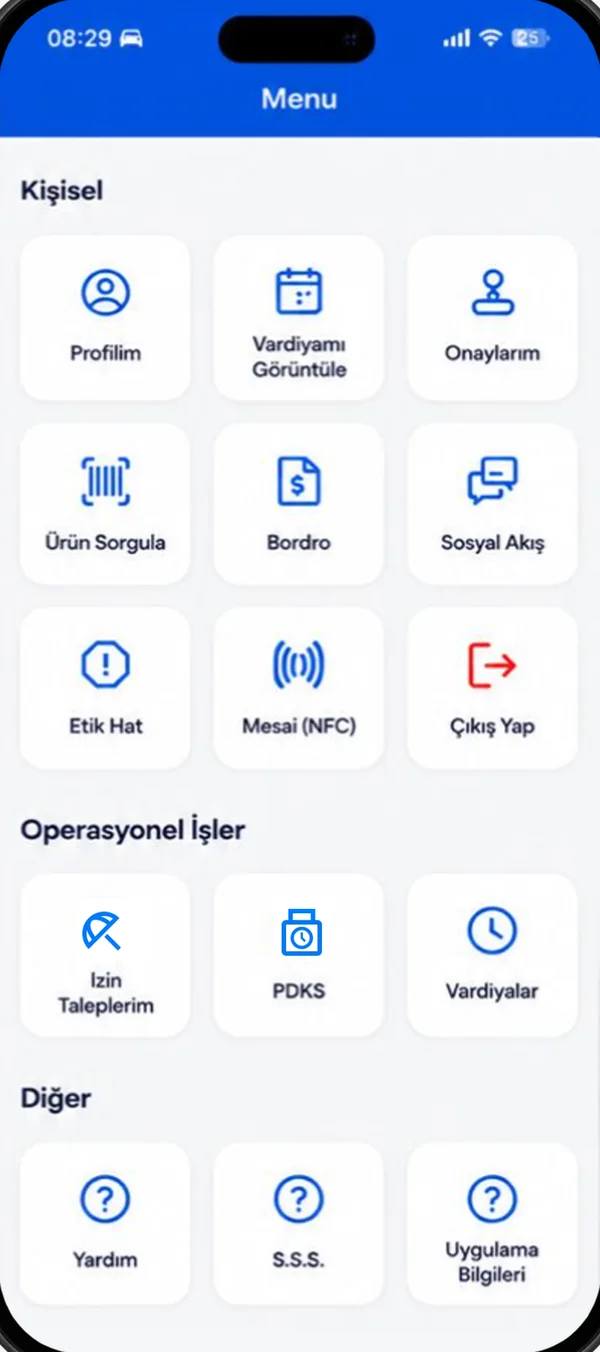
A tidy drawer instead of a cluttered desk: leave, payslips, expenses, announcements and tasks in the same place and the same order for every employee.
Everything an employee needs
Profile and My Day
Organisation, team and manager; a timeline of the day. Privacy preferences stay in the employee’s hands.
Leave
Leave types, requests, remaining balance and approval flow; hourly leave.
Payslips
Bulk generation, PDF verification, approval by SMS code or objection.
Expenses
AI reads the date, amount and VAT from a receipt photo; transfer to the ERP.
Announcements and notifications
Targeted announcements with read tracking; quiet hours and a daily notification limit.
Social feed and ethics line
Sharing within the team; named or anonymous ethics reports with a tracking number.
The planner in the office and the employee in the store see the same information.
Employee 360 shows the same content in the portal and in Yetkin Mobile Plus. Data is not copied; permissions stay in the source module.
About employee experience
What data does Employee 360 hold?
Only profile preferences (title, about, visibility). All other data stays in its source modules; Employee 360 brings it together in one view without copying it.
How does payslip approval work?
The employee views the payslip as a PDF and approves it with an SMS code or raises an objection; the payslip is stamped with a timestamp and an e-signature.
See the workspace with your own role structure.
Let’s plan a short demo with your HR team.